


ego (lite) is a browser where you and your AI agents work in parallel. Your agents run multiple browser tasks in their own Spaces while your tabs stay yours, and tasks complete faster on fewer tokens.
For the last year, a lot of us have been trying to get AI agents (Claude Code, Codex, Continue) to do real browser automation in a real browser. Pull a list off a logged-in admin panel. Fill out a vendor form. Run QA in a staging environment. The tools for these exist, and yet the experience of actually doing it remains rough.
ego (lite) is our attempt at fixing that.
What is ego (lite)
ego (lite) is built deep inside the Chrome ecosystem. Same engine as Chrome, with your bookmarks, extensions, and logged-in sessions all carried over in full. You don’t have to change how you browse. It works out of the box.
What truly sets it apart is its native support for agents:
- Code base, not CLI base, for faster runs with fewer tokens on complex tasks. The capabilities ego (lite) exposes to the agent are wrapped as JavaScript functions the agent calls directly. The agent gets to do what it does best: write code, composing a multi-step task into a single output instead of getting stuck in a “call two commands, look at the result, call two more commands” loop. Compared to the conventional CLI approach, complex workflows finish 20–50% faster with higher task success rates and far fewer tool calls per task. The same pattern shows up in internal benchmarks against Vercel’s agent-browser, where the harder the workflow, the bigger the gap.
- A dedicated Space for every agent. ego (lite) gives each agent its own fully isolated Space. You browse up front, your agent works in the background, and they don’t get in each other’s way. You can see which Space has an agent running at any moment, and take it over or stop it whenever you want. If you’ve used agent-browser tools that bridge into Chrome, you know the mess of windows and tabs popping up everywhere. ego (lite) fixes that at the root.
- Your agents multitask in Spaces, parallel workspaces inside the same browser. Each Space gets its own AI agent or its own task, all running at the same time. Claude Code enriching 10 leads in 10 parallel Spaces. Codex scraping 5 competitor sites in 5 more. They don’t collide or steal your tabs. Your mouse stays where you left it.
- The strongest page Snapshot on the market. Thanks to kernel-level customization, ego (lite) produces the highest-quality page snapshots, the view text models rely on to “see” and act on a webpage. It reliably handles tough cases like deeply nested iframes, exactly where other approaches consistently break down.
- Any agent can drive it through
ego-browser.ego-browseris the connection layer between any agent CLI (Claude Code, Codex, Cursor, or a custom one) and ego (lite). It exposes the browser as a set of in-page JavaScript tools: snapshot, fill, click, wait, navigate, capture. The agent writes a JavaScript snippet calling those tools, andego-browserruns it on the page in one pass. - Experience accumulation that makes your agent faster the more you use it (coming soon). Most of an agent’s time on browser tasks goes to trial and error. ego (lite)’s official Skill distills every successful action into reusable tools and workflows, so similar tasks down the line run up to 5× faster. More on this further down.
Why we built ego (lite)
We have a view on the “is the GUI dying” question. The GUI is here to stay. What’s going to change at the root is who provides it. Today every platform ships its own pre-built interface. Tomorrow your personal agent generates one for you on the fly.
That’s the future. The reality today is that agents already have to do a lot of real work, and the world isn’t built for them yet. Plenty of services still ship no API and no MCP. Information and functionality stay locked inside the GUI, packaged for a human user. If you’ve tried using Codex or Claude Code to do research, or to push through work that depends on a SaaS tool, you know what this means. The agent still has to open a browser and talk to this old world.
So more and more agent products are bolting a browser onto themselves. Some ship a stripped-down browser embedded in the client. Others ship an extension that bridges into your existing Chrome. None of them work well enough. The Chrome-bridge approach is unstable: logged-in sessions carry over sometimes and not others, tabs pop into new windows for no reason, headed and headless modes flip out of control. The embedded approach isn’t a real browser, and it falls apart on anything complex.
There’s a deeper reason all of these fall short. The browser was never designed for an agent. Every interaction detail in Chrome, tabs, windows, navigation, permissions, was built around a human user. Nobody asked how an autonomous agent would work with it. The bridge tools and the embedded tools are both patches on a system that never left room for an agent. The problems are the natural consequence.
The other half of the problem: none of these tools have seriously thought about what a browser for an agent should actually be. They over-wrap the browser and hand the agent a few CLI commands, underestimating what an agent can orchestrate on its own. Or they swing the other way, expose the raw protocol, and dump all the raw noise onto the model.
That’s why we built ego (lite). We wanted to rethink the browser from the ground up, and make it the smoothest seam between you, your agent, and the web.
How we built ego (lite)
Before we wrote any code, we had to settle one question: how should an agent interact with a browser?
Our answer was three layers.
The first layer is vision and action. The agent “sees” the page the way a human does, then clicks, types, scrolls. This is the baseline any browser should give an agent.
The second layer is wrapped method calls. We took the operations that come up often, Snapshot being the canonical one, and gave them clean abstractions. We held back on purpose. No piling on a hundred methods. The goal was to keep the abstraction sharp, not exhaustive.
The third layer is direct access to the browser’s underlying capabilities. When the agent really needs raw control, it’s there.
The point of the three layers is that the agent picks whichever fits the task. A simple click doesn’t need a raw protocol call. A complex flow doesn’t get squeezed into a single CLI command.
Why JavaScript, not Python or Shell
Code over CLI is the architectural choice. Within that, why JavaScript and not Python or Shell? Two reasons drove it.
The first is cognitive load. What ego (lite) injects into the page is already JavaScript. If the orchestration code in the background were in a different language, the agent would switch syntax between two contexts on every task. That’s unnecessary friction. One language across the whole task means the agent only has to think in one mode.
The second is environment stability. We can’t assume every user has Python installed, or a shell that behaves the same as ours. Rather than depend on the user’s environment, we bring the runtime with us. We reuse the V8 engine already inside the browser, trim down the rest of Node.js, and ship a complete Node runtime inside ego (lite). The install size goes up by only 6MB.
How fast is ego (lite)?
We benchmarked ego (lite) against Vercel’s agent-browser on four complex browser automation tasks. ego (lite) finished each task up to 245% faster, with substantially fewer tokens.
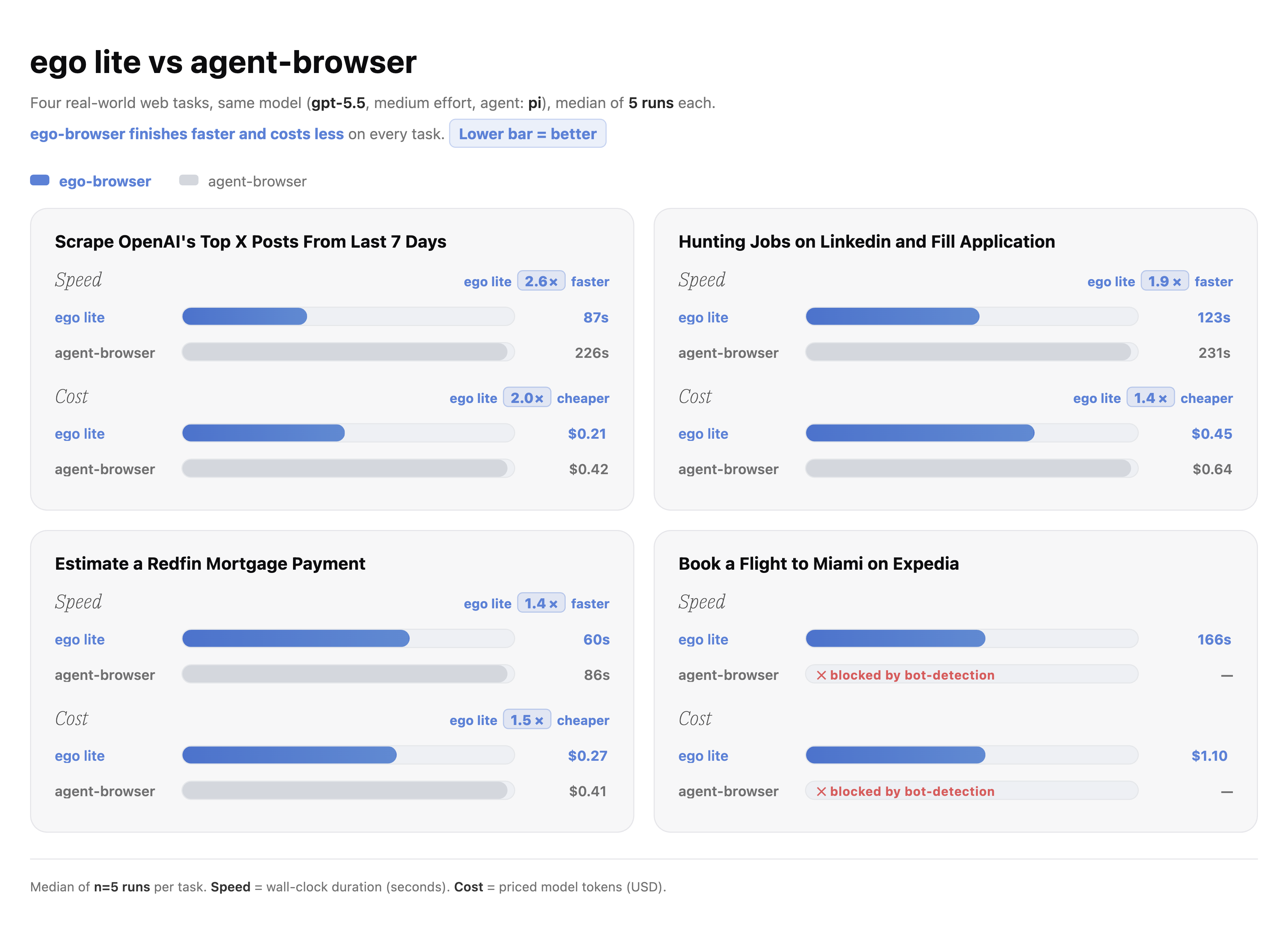
The harder the task, the bigger the gap.
Two design decisions made the difference. First, the three-layer JavaScript interaction above. The agent writes one snippet that runs many actions in a single pass, instead of chaining one CLI call at a time. Second, the kernel-level Snapshot built inside our custom Chromium engine, which reaches into cross-origin iframes, shadow DOM, and third-party SDK widgets that JavaScript-shim snapshotters silently drop.
The more you use it, the faster it gets (Coming soon)
We’re testing an experience accumulation mechanism inside ego (lite)’s official Skill. Every successful task gets distilled into reusable tools and workflows, scoped per domain. The next time your agent runs a similar task, it loads those tools and skips the trial-and-error.
The ideal version of this would be the agent capturing experience while running the task. We tried that first. The evaluation results pushed us back. When the model is asked to optimize for both the task itself and the experience capture in the same run, task success rate drops and execution slows down. Trying to do both well at once means doing neither well.
So we split it into two phases. During execution, the agent focuses on the task and does nothing else. Once the task is done, a separate accumulation phase kicks in, where the agent reads the relevant docs and builds up the tools and lessons. This progressive disclosure approach has hit the speedup we were after. Internal tests on complex tasks show repeat runs are up to 2.6× faster than the first run, with significantly fewer tokens.
The UX is still where we’re not happy. After the task finishes, the user has to wait for the accumulation step before the final result lands, and that wait isn’t smooth yet. One direction we’re considering is to put the accumulation in the user’s hands. Let the user decide whether to fire off an experience capture after a task wraps. No forced wait, and the user gets more control over how their agent grows.
We’re still polishing this, and we’ll ship it broadly once it hits the bar.
ego (lite)’s position in our stack is simple: a browser that works for both you and your agents, nothing more, nothing less.
What’s the difference between ego (lite) and existing tools
| Feature | ego (lite) | browser-use | Agent Browser (Vercel) | ChatGPT Atlas | Perplexity Comet |
|---|---|---|---|---|---|
| Multitask | ✓ | — | — | — | — |
| Reusable skills | ✓ | — | — | — | — |
| Inherits Chrome’s data | ✓ | — | — | ✓ | ✓ |
| Same browser, separate workspace | ✓ | — | — | — | — |
| Compressed semantic input | ✓ | — | ✓ | — | — |
| Controllable by external agents | ✓ | ✓ | ✓ | — | — |
| Data stored locally | ✓ | ✓ | ✓ | — | — |
| No login friction | ✓ | — | — | ✓ | ✓ |
| Daily-use browser | ✓ | — | — | ✓ | ✓ |
| Free | ✓ | ✓ | ✓ | — | — |
Why are we called “ego”
Modern culture leans heavily into “low ego.” We get the intention. Too much self really can hurt other people. But the trend has drifted past the point. It’s become a kind of rhetoric that packages self-suppression as a virtue, and grinds people down into cogs in a much larger machine.
As AI takes on more and more of the work, we think the opposite. This is the moment to look again at what “self” is worth. The stronger the tool gets, the more valuable the human judgment, personality, and independent thinking behind it become. They shouldn’t be diluted. They should be amplified.
The real danger is not that computers will begin to think like men, but that men will begin to think like computers.
So we called it ego. Not a call to be selfish. A bet that your intuition, your identity, and your own judgment are worth protecting in the first place.
The “lite” in ego (lite) means this isn’t all of ego. There’s a full version of ego with a personal agent, a cloud sandbox environment, system-level capabilities beyond the browser, and a memory system. We ship the two as separate products.
Try it
ego (lite) is free on macOS today. Windows and Linux are on the roadmap. All browser actions are driven by your own agent, not by our servers. That’s the reason we can keep ego (lite) free for individuals.
- Download the
.dmg. - Or run the
curlcommand from inside any agent CLI terminal. One command installs the browser,ego-browser, and writes the skill into your agent’s skill directory.
Onboarding asks you one question (whether to migrate your Chrome data) and handles the rest.
If you’ve been frustrated trying to wire an AI agent into a real browser, go try ego (lite), it won’t disappoint you.
One last thing worth keeping in mind: ego (lite) gives your agent real browser-operation capabilities — both reading page contents and executing actual actions — so make sure the agent you let drive it comes from a source you trust.